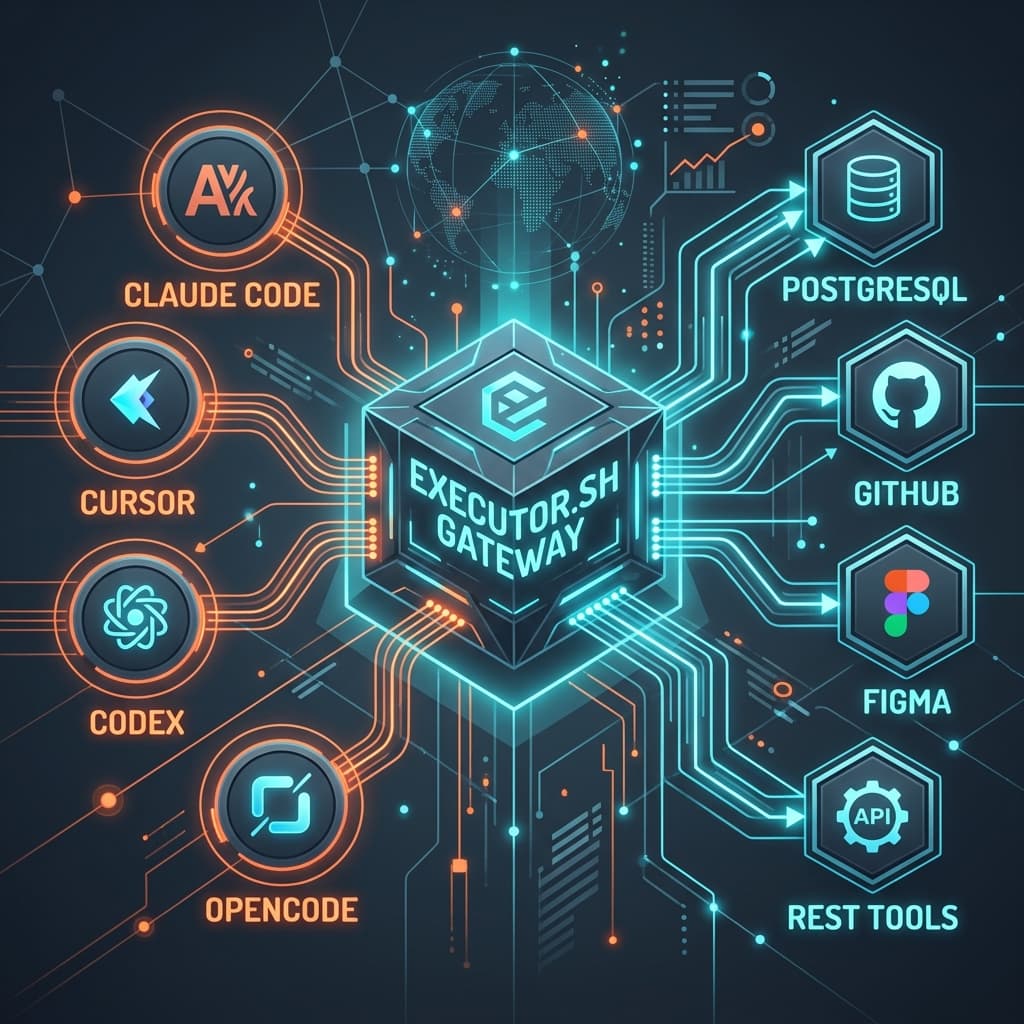

As enterprise engineering teams adopt multiple AI coding agents (Claude Code, Cursor, Codex, OpenCode, Pi), managing individual Model Context Protocol (MCP) server connections becomes a major operational bottleneck.
Maintaining dozens of standalone local MCP servers (PostgreSQL, GitHub, Figma, Slack, Jira) scattered across developer mcp.json files introduces three critical risks: API key sprawl, duplicated maintenance, and lack of centralized auditing.
Executor.sh (https://executor.sh/) solves this by acting as an open-source, self-hosted MCP Gateway. Any MCP-compliant AI client connects to a single endpoint and accesses all federated enterprise tools securely.
Comparison: Standalone MCP Servers vs. Executor.sh Gateway
| Feature | Standalone Local MCPs | Executor.sh MCP Gateway |
|---|---|---|
| Client Configuration | Copy N JSON blocks per developer IDE | 1 single HTTP/stdio endpoint for all agents |
| API Token Security | Keys exposed in raw local JSON files | Credentials vault on secure server |
| Protocol Support | Native MCP servers only | MCP + OpenAPI Specs + GraphQL + Custom Scripts |
| Tool Updates | Restart IDEs and update local configs | Centralized hot-reloading without client restarts |
| Audit Logging | Impossible to audit centrally | Centralized audit log for EU AI Act compliance |
5 Key Technical Advantages of Executor.sh
- Single Point of Connection: Instead of defining 15 separate server blocks in Cursor, Claude Code, and OpenCode, agents point to
http://localhost:8080/mcpor runnpx -y @executor/client. - Heterogeneous Protocol Harmonization: Executor.sh converts OpenAPI (Swagger) specs, GraphQL endpoints, and custom REST scripts into MCP-compliant tool definitions automatically.
- Enterprise Credentials Vault: Enterprise private keys (PostgreSQL credentials, GitHub PATs, Stripe keys) remain in the gateway server environment. Developers never store raw API secrets locally.
- EU AI Act Compliance (August 2026): Routing all tool executions through a single proxy records every input payload and mutation response for mandatory audit trails.
- Hot-Reloading without IDE Restarts: Adding a new tool on the gateway makes it immediately accessible to all connected AI agents without restarting local IDEs.
Step-by-Step Setup Guide for Executor.sh
Step 1: Deploy the Gateway Server via Docker
The most reliable deployment strategy for Executor.sh is Docker:
docker run -d \
  --name executor-mcp-gateway \
  -p 8080:8080 \
  -v $(pwd)/config:/app/config \
  -e GATEWAY_SECRET_KEY="your_secret_key_here" \
  executor-sh/gateway:latest
Step 2: Define Your Tool Catalog (executor.yaml)
Create a central configuration file declaring federated services:
version: "1.0"
server:
  port: 8080

tools:
  - name: postgres-db
    type: mcp
    transport: stdio
    command: npx
    args: ["-y", "@modelcontextprotocol/server-postgres", "postgresql://user:pass@localhost:5432/db"]

  - name: internal-erp-api
    type: openapi
    spec: https://api.yourcompany.com/v1/swagger.json
    headers:
      Authorization: "Bearer ${ERP_API_KEY}"

  - name: figma-context
    type: mcp
    transport: stdio
    command: npx
    args: ["-y", "figma-developer-mcp", "--stdio"]
    env:
      FIGMA_API_KEY: "${FIGMA_PAT_TOKEN}"
Step 3: Connect AI Agents to Executor.sh
Your mcp.json file across Cursor, Claude Desktop, OpenCode, Pi, or Codex collapses to a single entry:
{
  "mcpServers": {
    "executor-gateway": {
      "command": "npx",
      "args": ["-y", "@executor/client", "--url", "http://localhost:8080/mcp"],
      "env": {
        "EXECUTOR_AUTH_TOKEN": "your_user_token"
      }
    }
  }
}
📊 AI Tool Infrastructure Maintenance Impact:
- Manual MCP Management: 15 servers x 10 developers = 150 config points ➔ API token leaks
- Executor.sh Gateway: 1 central server ➔ 0 local secrets ➔ Real-time audit trails
🔒 Centralize and Secure Your Business AI Infrastructure
Deploying coding agents without a unified gateway exposes your organization to credential leaks and regulatory gaps. At IA4PYMES, we help engineering teams design and deploy corporate MCP gateways and observability stacks.
Book your 60-minute technical consultation here (100% refundable or credited against final development costs).
Architectural Best Practices
- Network Isolation: Deploy the Executor.sh container within your private VPC to restrict port 8080 access exclusively to internal VPN connections.
- Rate Limiting Guardrails: Configure call frequency rules in
executor.yamlto prevent infinite agent execution loops from exhausting commercial API limits. - Observability Integration: Forward gateway metric logs to your telemetry stack (Langfuse or Arize Phoenix) as outlined in our AI Agent Evaluation Gap Guide.
- Pair with Frontier Reasoning: Combine unified gateway tooling with frontier models like Claude Opus 5 or Gemini 3.6 Flash.