
Thinking Machines Lab released Inkling 2 Mini on November 20, 2026, a multimodal model with open weights under the Apache 2.0 license. It has 26.4 billion parameters in total and 3.4 billion active per token. It supports up to 1 million tokens of context, accepts text and image input and takes up about 20 GB. According to the lab, it runs on any Mac with 32 GB of RAM through Ollama.
This article covers what the model is, what its results actually say against Qwen3.8-27B, what it means for a small business to run it on its own hardware, and how to install it step by step with Ollama and with llama.cpp in GGUF format. All performance figures come from the lab itself and are labeled as such.
1. What is Inkling 2 Mini?
Data from the official Thinking Machines announcement, its model card and the Hugging Face article:
| Item | Value |
|---|---|
| Date | November 20, 2026 |
| License | Apache 2.0. The model card also links an acceptable use policy worth reading |
| Parameters | 26.4 billion total and 3.4 billion active per token |
| Effective parameters | 5.4 billion per token when counting the three passes of the loop |
| Architecture | Mixture-of-experts (MoE) transformer with looped layers |
| Experts | 128, of which 8 are active per token |
| Context | Up to 1 million tokens |
| Input and output | Text and image in. Text out |
| Checkpoint size | About 20 GB, in mixed NVFP4 and MXFP8 precision |
| Languages | The model card lists English and general multilingual support |
What "looped" means
The model has 24 layers. The 12 middle layers run three times per token with the same weights, so each token goes through 48 layer applications while the disk holds the weights of only 24. That is why the model is small on disk and computes more than its size suggests: each extra pass adds roughly 1 billion effective parameters, up to the 5.4 billion cited.
You will see a confusing set of numbers in the press. Depending on the source, active parameters appear as 3 billion (Hugging Face article), 3.4 billion (Thinking Machines) or 5.4 billion (Ollama and Unsloth). They describe the same thing measured in different ways. Even with the highest figure, the compute per token stays well below that of a dense 27-billion-parameter model such as Qwen3.8-27B.
How it was trained
According to the lab, training started with 384 experts and 8 active per token. Midway through, two thirds of the experts were pruned, keeping the 128 most used in each layer. Quality was then recovered with one trillion tokens distilled from a larger internal model, and training finished with reinforcement learning.
There is a second variant
Thinking Machines also published TML-d24-varloop-research, a research variant with a variable number of passes. With 1 or 2 passes instead of 3, inference is faster and quality slightly lower. The Hugging Face article says they tested it but did not evaluate it in depth, so for real work use Inkling 2 Mini.
2. Is it better than Qwen3.8-27B?
In part. The figures below come from tables published by Thinking Machines, which are the manufacturer's own results and have not yet been independently replicated. The Hugging Face article adds that more validation is needed before saying it is at least comparable to Qwen3.8-27B.
The comparison from the official announcement, under the same conditions for both:
| Test | Inkling 2 Mini | Qwen3.8-27B |
|---|---|---|
| Artificial Analysis Index (v5.0) | 20.1 | 20.1 |
| DeepSWE v1.1 | 48.2% | 42.2% |
| SWE-bench Pro (Hard) | 77.9% | 73.8% |
| SWE-bench Verified | 79.2% | 77.8% |
| Terminal Bench v2.1 | 71.6% | 73.0% |
| BrowseComp | 79.0% | 61.6% |
| DeepSearchQA | 85.3% | 79.7% |
| MCP Atlas | 82.7% | 77.3% |
| JobBench | 49.6% | 33.4% |
| AutomationBench-AA | 41.8% | 48.2% |
| GDPVal-AA | 1319 | 1427 |
| GPQA Diamond (model card) | 86.6% | 90.5% |
| MMMU Pro | 74.9% | 76.3% |
| AA-Omniscience, non-hallucination rate | 63.4% | 71.4% |
Inkling 2 Mini ties on the Artificial Analysis aggregate index and wins on agentic coding, search and tool use. Qwen3.8-27B wins on scientific reasoning, on one of the terminal tests, on office automation tasks and on how often it avoids inventing answers. According to Thinking Machines, Inkling 2 Mini leads 32 of the 48 benchmarks against four models in its class, but that list does not include every model you might want to compare.
The lab acknowledges a limitation: Inkling 2 Mini is not the strongest small model for long multi-turn conversations or for instructions with many constraints. It scores 50.0% on MultiChallenge and 33.4% on ComplexConstraints v1.1. It also states that setting reasoning effort to its minimum does not fully disable reasoning.
One more point for anyone working in Spanish: the model card mentions English and general multilingual support and publishes no per-language results. Test the model on your own Spanish texts before deciding.
3. What it means for a small business
Running a model like this on a laptop with 32 GB affects three costs and risks for a small business.
Data stays on your machine
With a local install, documents do not leave your network. For a business handling contracts, payroll or customer histories, that removes part of the data protection work: in principle there is no transfer to a third-party provider and no data processing agreement to negotiate for using the model. Processing is still yours, and so are the security obligations for the machine.
Cost stops depending on usage
An open model is paid for once, in hardware. Your API bill for those tasks is zero, in exchange for someone installing, updating and monitoring the machine. To see whether it pays off, compare your current monthly API spend with the cost of a machine and its upkeep. In our article on model routing we explain how to split tasks between models so this calculation is realistic.
The provider cannot change the terms on you
A downloaded model does not rise in price, change its usage limits or get retired. If provider term changes in the cloud worry you, we cover them in the article on the Anthropic prospectus.
Tasks worth testing
These are hypotheses to measure with your own data:
- Coding and internal automation: the SWE-bench and DeepSWE results place it among the best at its size, according to the lab.
- Search across your own documents: the 1-million-token context lets you load long manuals, contracts or catalogs. The published long-context results go up to 256,000 to 512,000 tokens.
- Reading images and scanned documents: it accepts image input and scores 92.8% on OmniDocBench against 91.5% for Qwen3.8-27B, according to the official announcement.
Where it does not fit at the start: customer service assistants with long conversations and many tone rules, because of the limitation the lab itself acknowledges.
4. Hardware requirements
What the official sources say:
- Thinking Machines and Ollama: a Mac with Apple Silicon and at least 32 GB of memory (MacBook, Mac mini, Mac Studio) or an NVIDIA DGX Spark. For other GPUs, the model card recommends 32 GB of VRAM or more.
- Unsloth, quantized GGUF versions: its memory table (RAM plus VRAM, or unified memory) lists 9 GB for 1-bit, 10 to 11 GB for 2-bit, 13 to 15 GB for 3-bit, 17 to 18 GB for 4-bit and 24 GB for 8-bit. It adds that long context, images and other open applications use more.
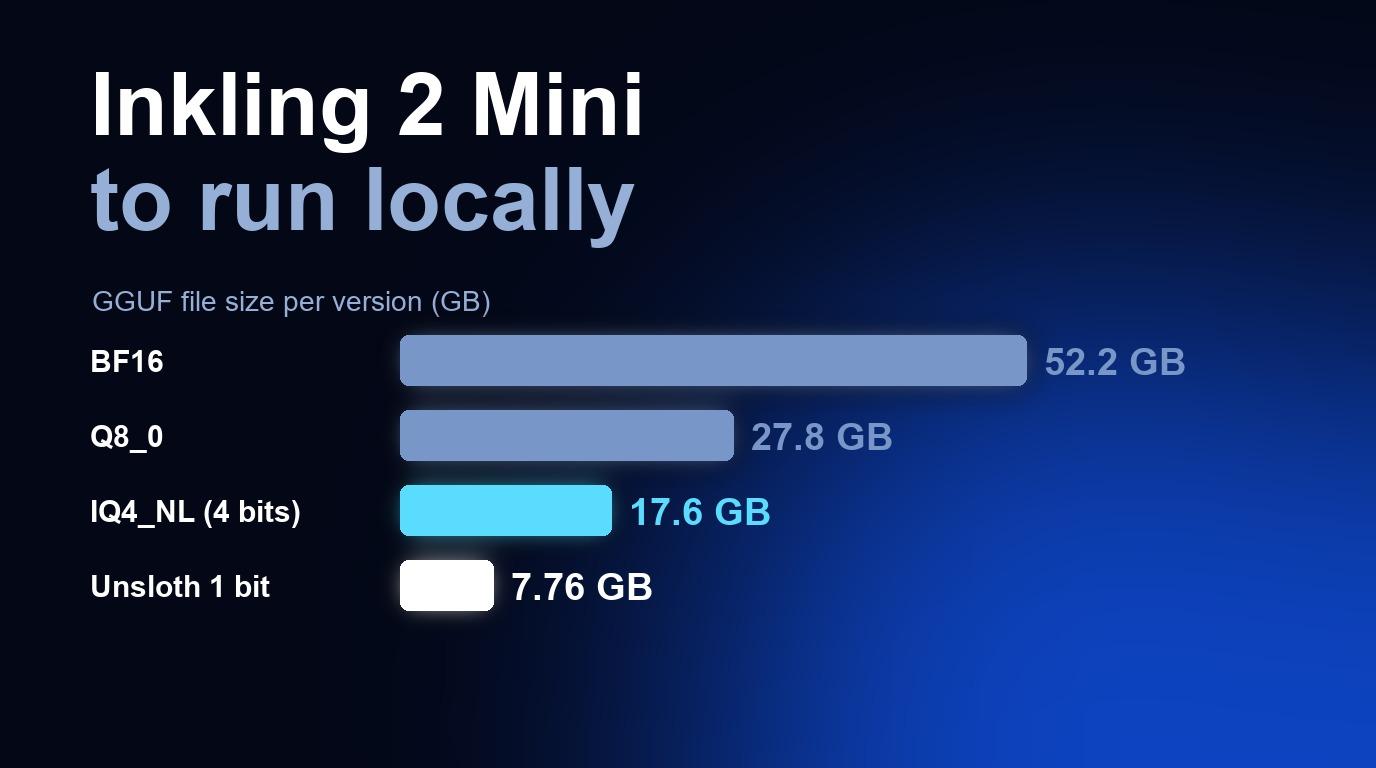
File sizes of the official GGUFs from ggml-org: IQ4_NL 17.6 GB, Q8_0 27.8 GB and BF16 52.2 GB, plus a vision projector of 346 to 642 MB. Among the Unsloth versions, the recommended one is UD-Q4_K_XL at 17.63 GB.
According to its model card, ggml-org measures quality loss against the original BF16: Q8_0 matches the most likely token in 97.6% of cases and IQ4_NL in 95.5%. Unsloth publishes an equivalent measurement for its own versions, with its own reference. The two tables are not comparable with each other.
A warning from the lab itself: support for looped models in local engines is new, and speed varies by engine and hardware. We found no tokens-per-second figures for small-business machines, so we give none. Measure it on your own machine.
5. Tutorial: install and run Inkling 2 Mini
There are three paths. Start with the first if you have a Mac.
Option A: Ollama (the simplest)
The model page on Ollama says it runs on a Mac with 32 GB or more, or on a DGX Spark. The download is 20 GB and includes the 1M-token context.
- Install or update Ollama from ollama.com. The pages state no minimum version, so use the latest.
- Open a terminal and run:
ollama run inkling-2-mini
The first time it downloads about 20 GB. Then it opens a chat in the terminal. The available tags are latest, 26b-a5b and 26b-a5b-nvfp4, and all three weigh 20 GB.
- To use it from your own applications, Ollama exposes a local OpenAI-compatible server on port 11434 while it is running.
Option B: llama.cpp with the official ggml-org GGUFs
This works on Windows, Linux and Mac, with or without a GPU. The commands are the ones shown on the ggml-org model card:
- Install llama.cpp. On Windows:
winget install llama.cpp
On macOS and Linux:
curl -LsSf https://llama.app/install.sh | sh
- Start the server with the 4-bit version (17.6 GB). The first time it downloads the model from Hugging Face:
llama serve -hf ggml-org/Inkling-2-Mini-GGUF:IQ4_NL
- For the 8-bit version, change the suffix to Q8_0 (27.8 GB). To chat in the terminal instead of starting the server, replace serve with cli.
The server offers an OpenAI-compatible API and a web interface. The model card does not state the port, so check the address the console prints at startup. These commands come from the model card; we have not run them ourselves.
Option C: llama.cpp with the Unsloth versions
Unsloth offers more sizes (from 7.76 GB at 1-bit up to 22.87 GB at 8-bit) and its own llama.cpp build. It is the option for machines with less than 32 GB of memory, at the cost of some quality in the smallest versions. The files in the repository root use Unsloth's own looped-layer layout, so Unsloth states you need its b12588-mix-c0c3de8 build, or the files in the Mainline_Support folder for standard llama.cpp.
On Windows with an NVIDIA GPU and CUDA 12, from PowerShell:
curl.exe -L -o llama.zip https://github.com/unslothai/llama.cpp/releases/download/b12588-mix-c0c3de8/app-b12588-mix-c0c3de8-windows-x64-cuda12-portable.zip
Expand-Archive llama.zip -DestinationPath llama.cpp
pip install -U huggingface_hub
hf download unsloth/Inkling-2-Mini-GGUF Inkling-2-Mini-UD-Q4_K_XL.gguf --local-dir Inkling-2-Mini-GGUF
.\llama.cpp\llama-server.exe --model Inkling-2-Mini-GGUF/Inkling-2-Mini-UD-Q4_K_XL.gguf --temp 1.0 --top-p 1.0 --top-k 0 --min-p 0.0 --host 127.0.0.1 --port 8080
Open http://127.0.0.1:8080 in your browser to chat. To use images, also download mmproj-F16.gguf (639 MB) and add --mmproj with its path. Without a GPU, add --n-gpu-layers 0. If you run out of memory, reduce --ctx-size. The Unsloth page offers other builds: CUDA 13, AMD ROCm, Vulkan and CPU only.
The sampling parameters Unsloth recommends are temperature 1.0, top-p 1.0, top-k 0 and min-p 0.0. The page also includes a 0.4 GB draft model (DSpark) to speed up generation through speculative decoding, with the arguments needed to enable it.
Controlling how much it reasons
Inkling 2 Mini supports the reasoning_effort parameter, with values none, minimal, low, medium, high (the default), xhigh and max, or a number between 0.0 and 0.99. Lower effort answers sooner and uses less. Remember that the minimum does not fully turn reasoning off.
What to download and from where
Download files only from the official repositories: thinkingmachines, ggml-org and unsloth. Community versions with restrictions removed are already circulating on Hugging Face, and they may follow instructions the original model refuses. For business use, do not install them.
6. How to test it in your company in one week
- Pick one concrete task. For example, summarizing contracts or classifying incidents.
- Prepare 20 to 50 real cases. Anonymize them if you will test a cloud model for comparison.
- Measure three things: answer quality against what your current model gives, time per answer on your machine, and how often it invents a fact.
- Compare with your current cost. Add the machine and the upkeep time and divide by real usage.
With Inkling 2 Mini installed you can also compare against Qwen3.8-27B, for which we have a GGUF installation guide. To compare against the cloud without buying hardware, we reviewed NaN Builders, an inference service built on open models. And if you are considering a dedicated machine, this guide on the Mac Studio as a local server has its numbers.
Book your 60-minute technical consultation here and we will set up the test with your own documents, including the right machine and the data protection review.
Frequently asked questions
What is Inkling 2 Mini?
It is a multimodal model from Thinking Machines Lab with open weights and an Apache 2.0 license. It has 26.4 billion parameters, 3.4 billion active per token and a context of 1 million tokens. It was released on November 20, 2026.
Can a company use it for free?
The license is Apache 2.0, which allows commercial use. The model card also links an acceptable use policy worth reviewing. Downloading costs nothing, but running it requires suitable hardware.
What hardware do I need?
According to Ollama and Thinking Machines, a Mac with 32 GB of memory or a DGX Spark. Unsloth lists 17 to 18 GB for its 4-bit version and 24 GB for its 8-bit one, and offers versions from 9 GB with more quality loss.
Is it better than Qwen3.8-27B?
According to Thinking Machines' tables, it ties on the Artificial Analysis index, wins on agentic coding and search and loses on scientific reasoning and on the rate of invented answers. These are the manufacturer's own data, not independently replicated.
Does it work well in Spanish?
The model card lists general multilingual support and publishes no per-language results. Test it on your own texts.
What is a looped model?
It is a model that reuses its middle layers several times per token with the same weights. Inkling 2 Mini runs 12 of its 24 layers three times, which gives more compute without increasing size on disk.
Does my data leave my company?
With a local install, no. The model runs on your machine and needs no connection to any provider. Securing the machine remains your responsibility.